ELITE ZONES
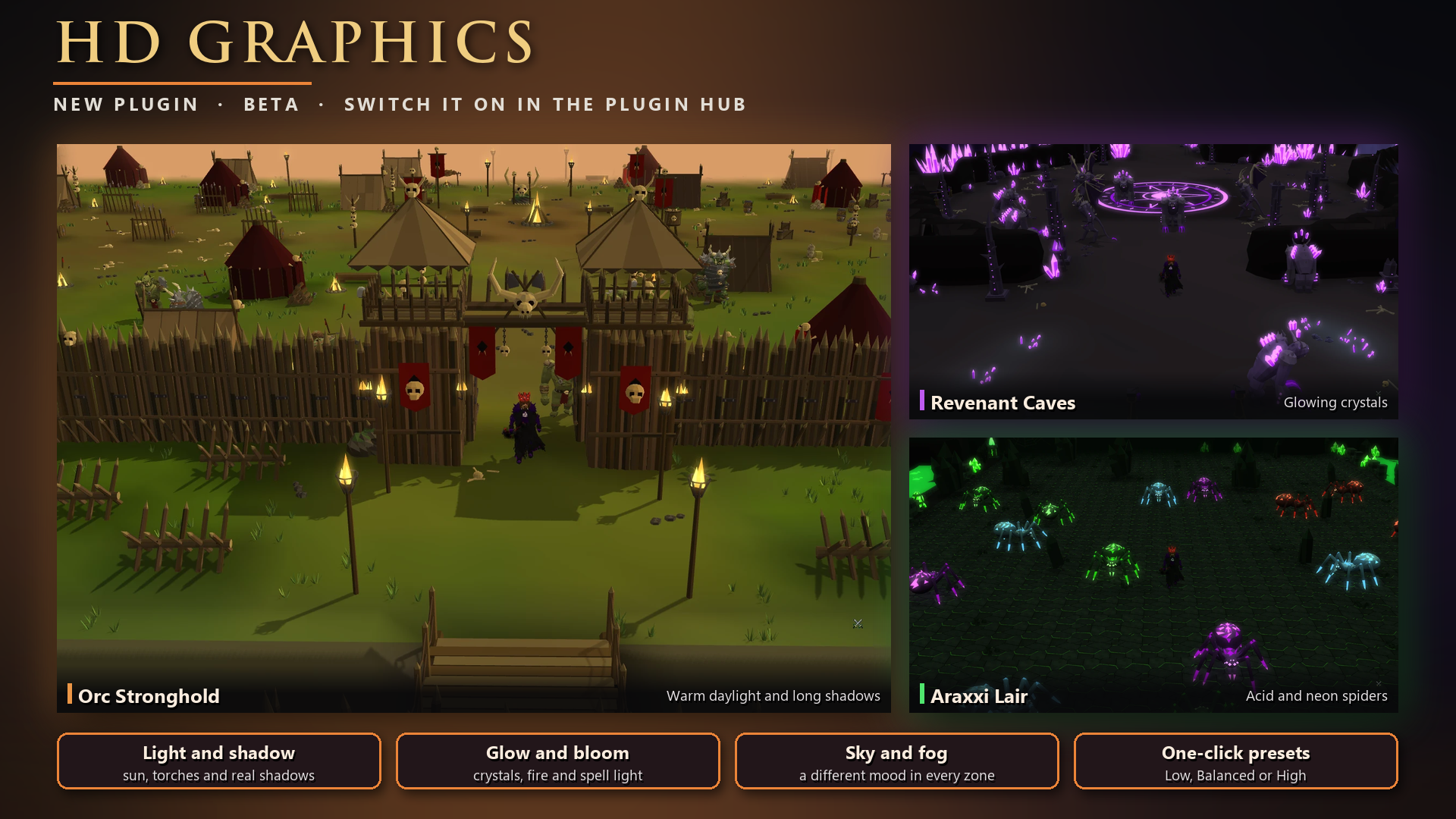
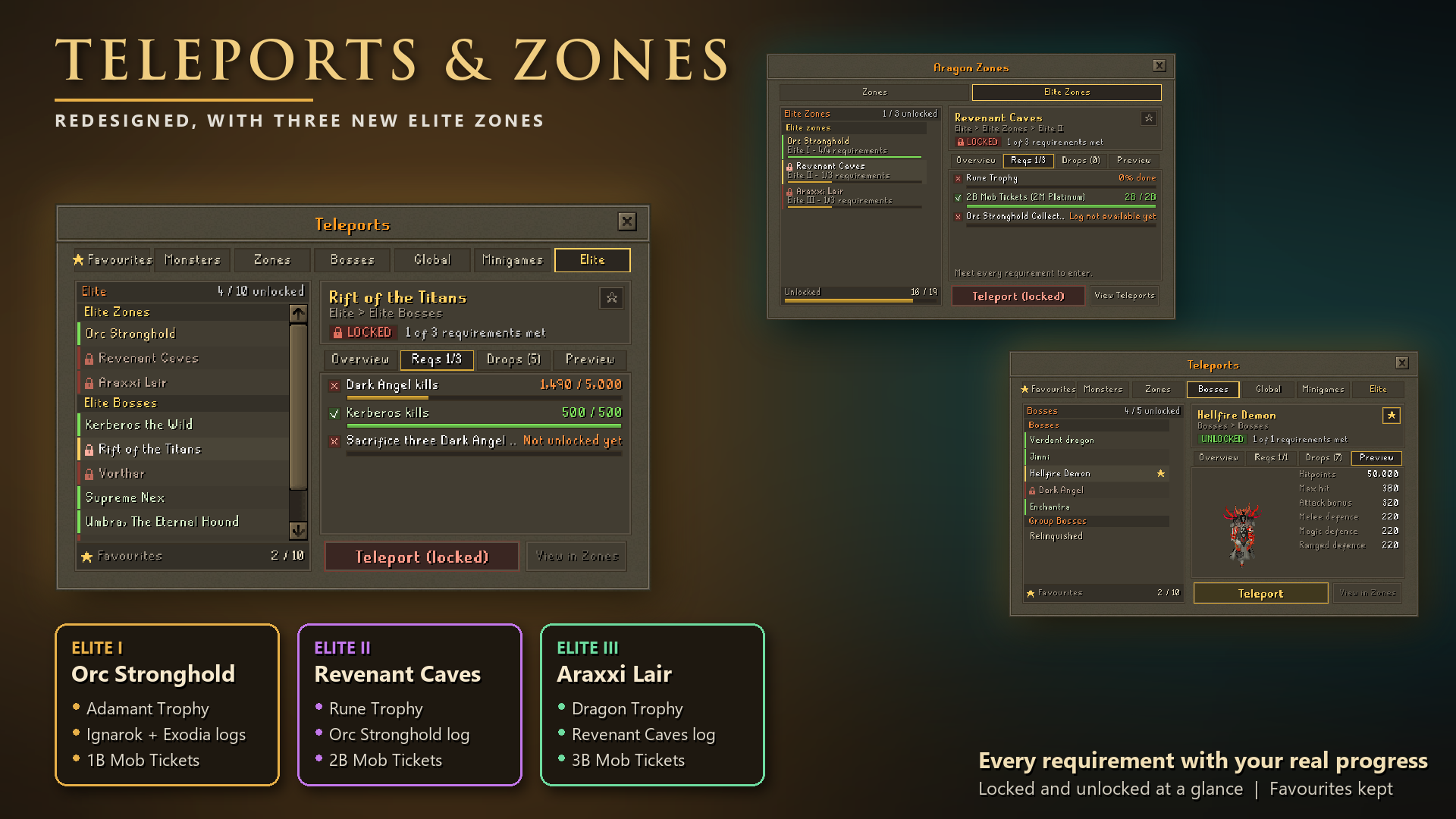
Three new Elite zones
Find them in the new Elite tab of ::teleport, or in ::zones (CTRL + Z).
Each Elite zone unlocks the next. Once you meet a zone's trophy and Collection Log requirements, you sacrifice its Mob Tickets once and the zone stays unlocked for good. You are never charged again.
Elite I: Orc Stronghold
- Adamant Trophy
- Ignarok and Exodia Collection Logs
- Sacrifice 1B Mob Tickets (1M Platinum)
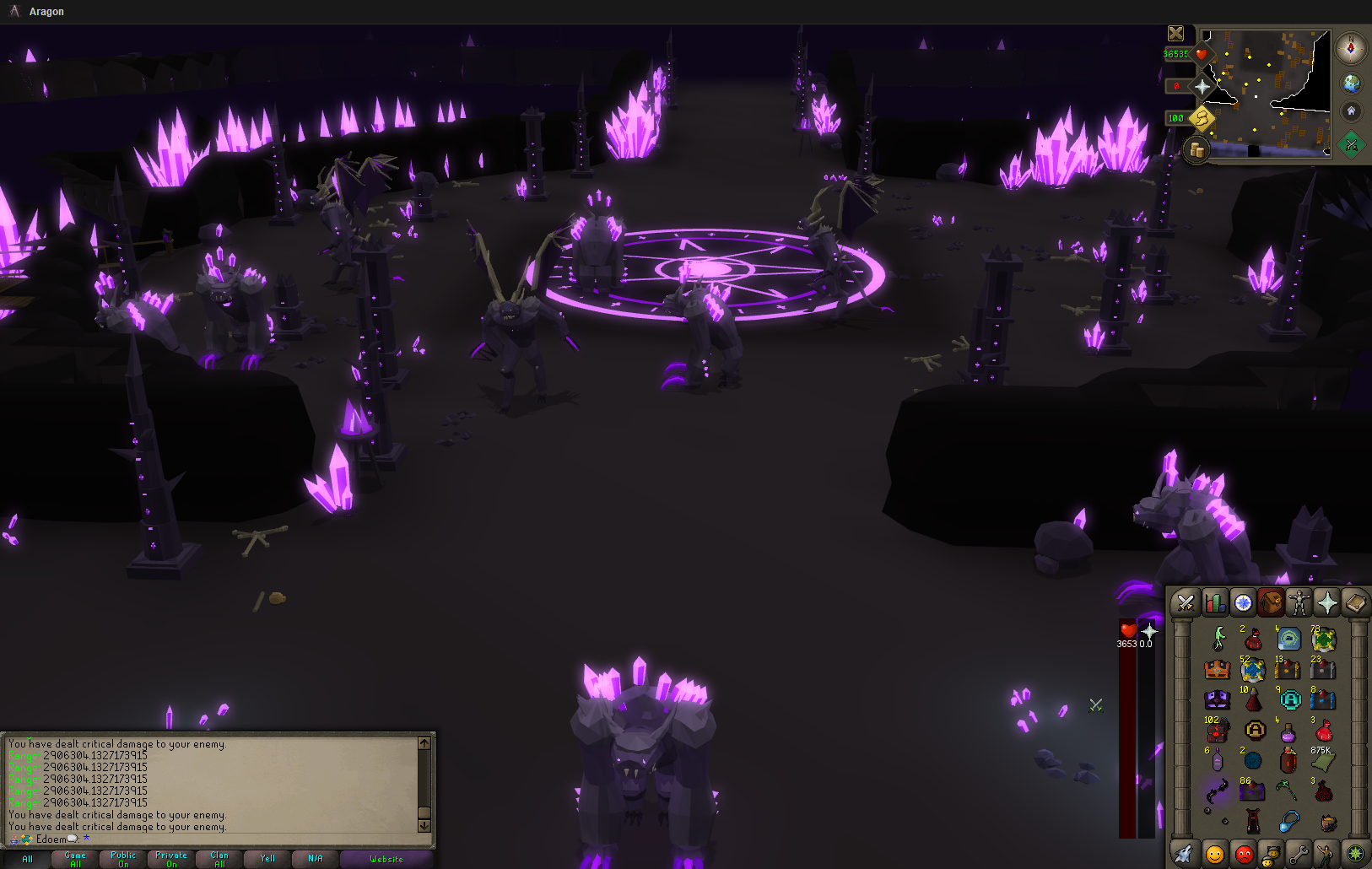
Elite II: Revenant Caves
- Rune Trophy
- Orc Stronghold Collection Log
- Sacrifice 2B Mob Tickets (2M Platinum)
Elite III: Araxxi Lair
- Dragon Trophy
- Revenant Caves Collection Log
- Sacrifice 3B Mob Tickets (3M Platinum)
Unlocking a zone
- When everything else is met and you have the tickets, the requirement turns gold and the button reads Unlock zone. You confirm the exact amount first.
- Tickets come from your currency pouch and inventory, and a Platinum Mob Ticket counts as 1,000. Your bank is never touched, so move tickets out first. Any change from a Platinum ticket goes back to your pouch.
Fighting there
- You fight your own monsters in every Elite zone, and other players can't take them.
- The Orc Stronghold and Revenant Caves are multi-combat, with 120 orcs and about 80 revenants per player, so area attacks hit several at once.
💰 Elite drops
Elite zone drops and rewards
Drops
- Every kill drops at least 1 of the zone's material (Warforged Scrap, Wraithdust or Araxxi Silk), with a 1 in 6 chance of 4-8 more.
- Every kill also has its own roll for a boss resource (Bloodoath Tokens, Runic Charges or Broodcall Glands): 1 in 6 for 1-2, or 3-6 from the toughest monster.
- Each monster drops its own part for the zone's signature item, and sometimes a cosmetic or a pet.
- Orc Stronghold: 150,000 Mob Tickets and 45M Taxbags (1/20)
- Revenant Caves: 250,000 Mob Tickets and 55M Taxbags (1/20)
- Araxxi Lair: 350,000 Mob Tickets and 65M Taxbags (1/20)
- Drop rate helps with rare drops (parts, cosmetics, pets, boxes). Common drops keep their normal rates.
Collection Logs (Zones tab of ::collectionlog)
- Orc Stronghold: 1 Apex Casket + 250 Bloodoath Tokens
- Revenant Caves: 1 Apex Casket + 400 Runic Charges
- Araxxi Lair: 1 Hydrix Casket + 500 Broodcall Glands
- Elite Rarities (cosmetics and pets of all three zones): 1 Solaris Casket
Elite pets
Each monster can drop its own pet (the spiders drop eggs). Summon it, or set it in your pet keepsake slot and summon any pet. Each kill of its own monster then has a 5% chance of an extra common drop.
Signature items (::upgrade, Extras tab, 100% success)
Each has 25,000 in every stat and +5% damage against Elite zone monsters, so all three give +15%.
- Warchief's Standard (cape): 2 of each orc part, 40,000 Warforged Scrap, 7,500 Bloodoath Tokens
- Sigil of the Sealed Gate (amulet): 3 Crystal Spines, 3 Hollowwing Membranes, 50,000 Wraithdust, 20,000 Warforged Scrap, 10,000 Runic Charges
- Band of the Brood (ring): 2 of each spider part, 60,000 Araxxi Silk, 25,000 Wraithdust, 12,500 Broodcall Glands
Hover over any new Elite item to see what it is for.
🧩 Plugins
Plugin Hub: make the client yours
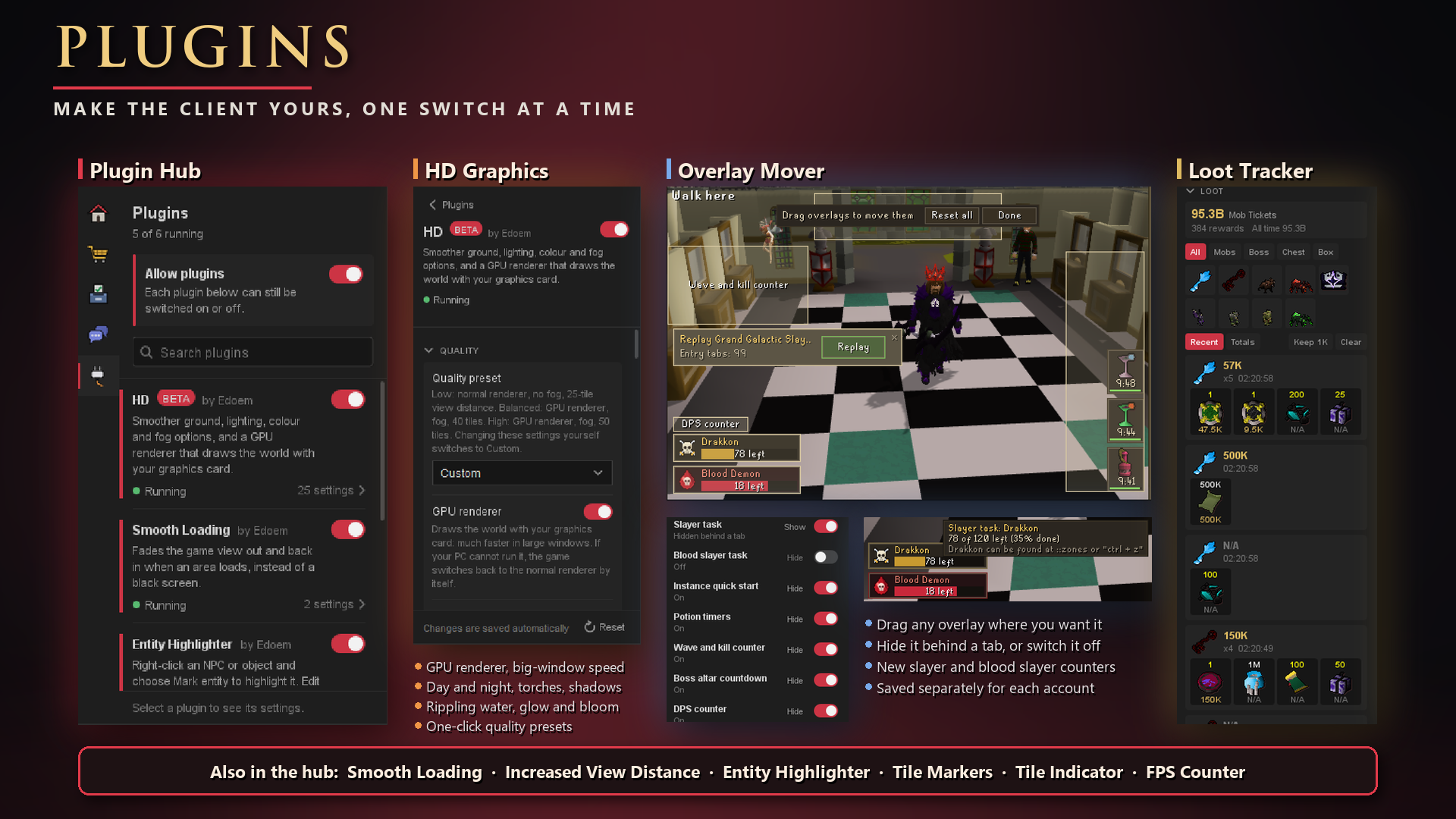
Click Plugins in the client sidebar to search every plugin, switch each one on or off, and open its settings. Your settings are saved separately for each account.
Loot Tracker (on by default, has its own sidebar button)
- Every reward: drops, bosses, instances, chests, boxes and minigames.
- Recent or Totals: see rewards newest first, or everything added up per source.
- Filters: use the type tabs, or click a monster or chest to see only that source.
- Value: see what your loot is worth in Mob Tickets. Items with no price show N/A.
- Your history: it's saved per account. You choose how many rewards to keep, and Clear asks you to confirm.
- Not tracked: a few small rewards, like the daily login reward, skilling pets and seasonal tokens.
Overlay Mover (on by default)
- Move anything: drag slayer counters, potion timers, boss alerts, the wave counter, instance quick start, the altar countdown and the DPS counter. Type
::overlaysto start. - Hide or switch off: fold an overlay into a small tab, or turn it off completely on the plugin's page.
- Sensible rules: overlays can't overlap each other or cover the map, side panel or chat box.
- Separate layouts: fixed mode and resizable or fullscreen each keep their own.
- New counters: slayer and blood slayer counters now show the monster, how many are left and a progress bar.
HD Plugin (BETA)
Plugin Hub: graphics and tools
HD (beta, off by default)
- GPU renderer: draws the world with your graphics card, for much smoother play in big windows. If it fails, the client goes back to the normal renderer.
- Lighting: day, evening, night or a full cycle, with torches, fires and spell glow.
- Effects: shadows, rippling water, shine, glow and bloom.
- Ground and fog: smooth ground colours, soft path edges, and distance fog with a sky colour.
- Presets: Low, Balanced or High in one click.
Increased View Distance (off by default)
See further than the in-game slider allows, from 50 up to 90 tiles, with a soft fade at the map edge. Your normal view distance setting isn't changed.
Smooth Loading (on by default)
The game view fades out and back in when an area loads, instead of a black screen.
Entity Highlighter (off by default)
Right-click an NPC or object and choose Mark entity to highlight it.
Tile Markers (off by default)
Shift + right-click a tile to mark it, then restyle the marker on the plugin's page.
Tile Indicator (off by default)
Highlights the tile you're on and the tile you're walking to.
FPS Counter (off by default)
Shows your frames per second on the game screen.
🪟 Client improvements
Smooth Loading
- When an area loads, the old view fades out and the new one fades in, instead of freezing or flashing black
- Choose the fade speed, and whether the loading box shows
Resizable and fullscreen
- The 3D view is no longer zoomed in. It matches fixed mode, and a wider window now shows more of the world to the sides
- The minimap, side panel and chat each sit neatly in their own corner, with new framing art
- The old frame style now works in every mode
- Click the open tab to fold the side panel down to its tab rows
- Fixed the minimap drawing outside its frame in fullscreen
One Settings window
- Ctrl + S, the settings button and All Settings in the Settings tab all open one new window, with tabs: Display, Interface, Chat, Gameplay and Broadcasts
- New sliders and buttons, and Sound effects is now a slider
- Sliders now save as soon as you let go
- Options that did nothing have been removed
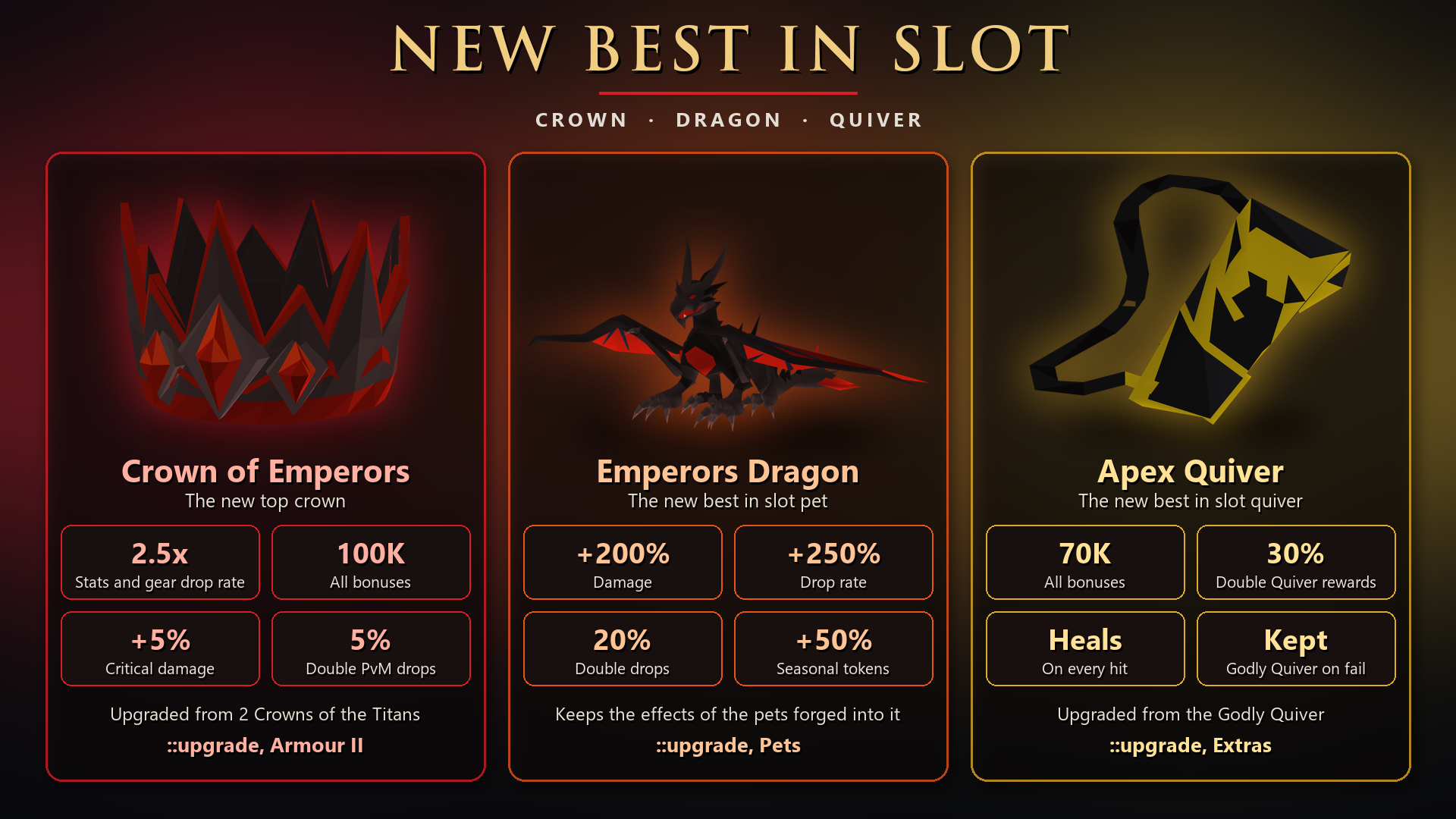
Crown of Emperors, Emperors Dragon and Apex Quiver: new best in slot
Three new best in slot items, all made in ::upgrade, plus a new pet and a new upgrade material.
Crown of Emperors (::upgrade, Armour II)
The new top crown, above the Crown of the Titans.
- 2.5x your stats and the drop rate of the gear you wear (the Crown of the Titans gives 2.25x).
- 100,000 in every bonus.
- +5% critical damage while worn.
- 5% chance to double each PvM drop.
- The same attack speed bonus as the other high crowns, and it counts in every set effect that accepts the Crown of the Titans.
Upgrade (always succeeds): 2 Crowns of the Titans, 50 Royal Shards, 25,000,000 Platinum Mob Tickets, 7,500 Diamond Taxbags and 200 Celestial Dust.
Celestial Dust (::upgrade, Extras)
A new upgrade material for the crown. Upgrade (50% per attempt): 100 Godly Dust, 1 Diamond Taxbag and 50M Mob Tickets. A failed attempt uses up the materials.
Emperors Dragon (::upgrade, Pets)
The new best in slot pet.
- +200% damage and +250% drop rate.
- 20% double drop chance and +50% seasonal tokens.
- Its dragonfire hits harder than the Stormborn Godfox's attacks.
- Keeps the effects of the pets forged into it:
- Stormborn Godfox: extra keys from raids and instances, better Wandering Merchant rewards, and more double drops on your Slayer task.
- Forsaken Pet: 25% chance of an extra Forsaken Trinity key.
- Tomb Raider Pet: about 50% chance of an extra Tombs of Osiris key.
- Cerberax Pet: +10% damage and 15% double loot at Cerberax.
- Vorthar Pet: 20% chance of an extra Vorthar Key.
- Crazy Pig Pet: better rare drop chances on world bosses.
Upgrade (always succeeds): 2 Stormborn Godfox, Forsaken Pet, Tomb Raider Pet, Cerberax Pet, Vorthar Pet, 3 Crazy Pig Pets, 25,000 Pet Tokens, 50M Platinum Mob Tickets and 7500 Diamond Taxbags.
Vorthar Pet
A small stone Vorthar that follows you. 20% chance of an extra Vorthar Key on each completion. It is a rare from the Vorthar Chest, about 1 in 5,000, and is also part of the Emperors Dragon upgrade.
Apex Quiver (::upgrade, Extras)
The new best in slot quiver, in Apex black and gold.
- 70,000 in every bonus (the Godly Quiver has 45,000).
- 30% chance to double Hall of the Quiver rewards (the Godly Quiver has 25%).
- Your hits heal you, like the other top quivers.
Upgrade (50% per attempt): Godly Quiver, 10,000 of each essence (Crimson, Azure, Verdant and Solar), 15 Toolboxes, 250 Diamond Taxbags, 1B Mob Tickets and 250 Godly Dust. You keep the Godly Quiver if an attempt fails; the other materials are used up. Each failure raises your chance on the next attempt.
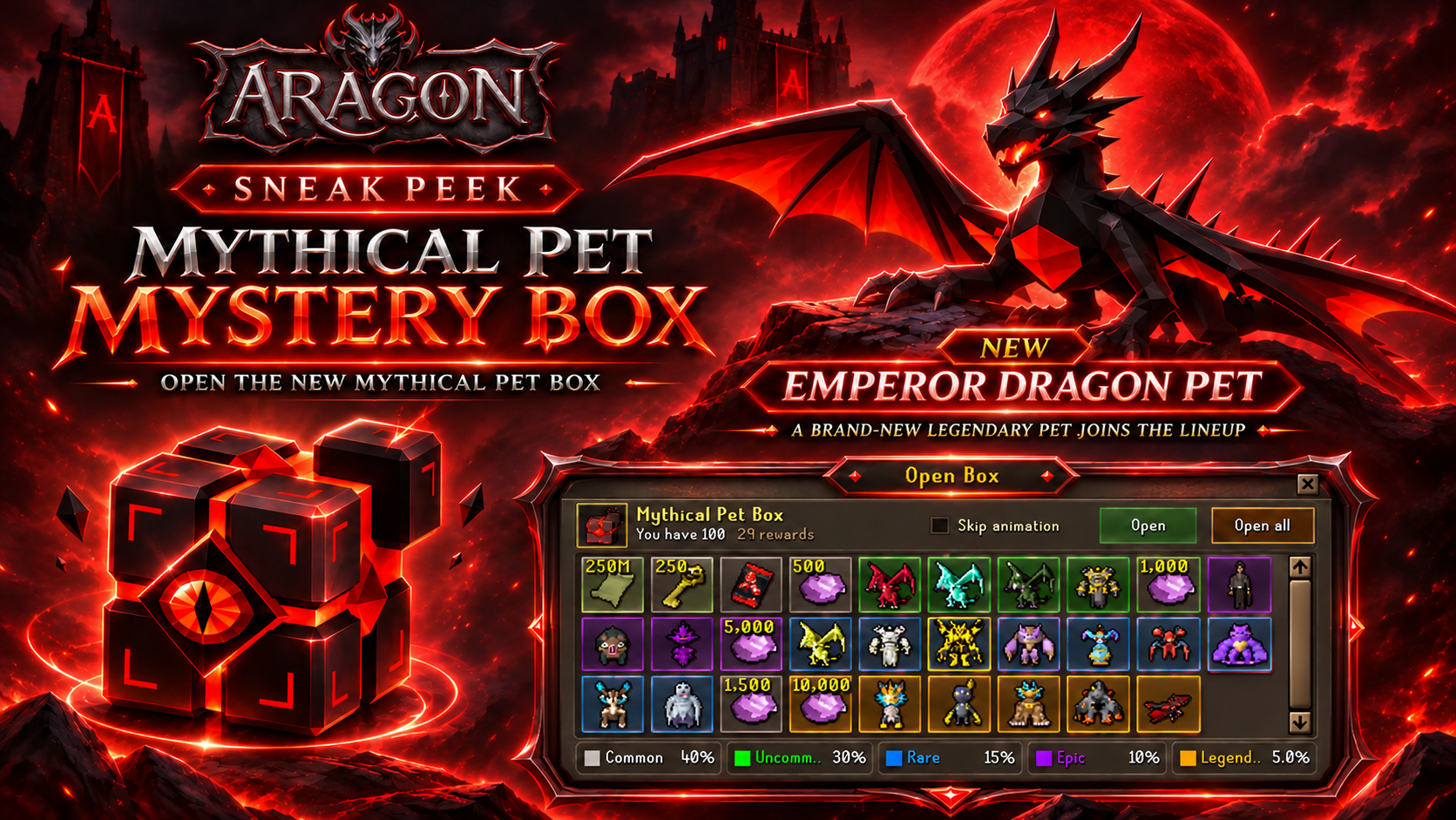
Mythical Pet Box
A new Mythical Pet Box arrives in Aragon containing a variety of legendary pets and the new Emperors Dragon Pet!
Elite PvM Perks
Spend your account perk points on bosses you actually fight. Each group needs the perks before it, as listed.
🐺 Kerberos
- Kerb Hunter — +10% drop rate at Kerberos
- Points: 250
- Needs: Nothing
🗿 Rift of the Titans
- Titan Enthusiast — 5% chance of double keys
- Points: 250
- Needs: Kerb Hunter
- Titan's Luck — 3% better chance of a rare chest reward
- Points: 250
- Needs: Kerb Hunter
💀 Supreme Nex
- Nex Hunter — 3% chance of double loot
- Points: 300
- Needs: Both Titans perks
- Nex's Luck — +5% drop rate at Nex
- Points: 500
- Needs: Both Titans perks
🌑 Umbra, the Eternal
- Umbra Hunter — 3% chance of double loot
- Points: 500
- Needs: Both Nex perks
- Umbra's Luck — +5% drop rate at Umbra
- Points: 500
- Needs: Both Nex perks
🏺 Tombs of Osiris
- Osiris Hunter — 3% chance of double keys
- Points: 750
- Needs: Both Sanctum of the Lost Kings perks
- Osirian Glory — 5% better chance of a rare chest reward
- Points: 750
- Needs: Both Sanctum of the Lost Kings perks
⚔️ Forsaken Trinity
- Trinity Lover — 5% chance of double keys
- Points: 750
- Needs: Both Umbra perks
👑 Vorthar
- Vorthar Grinder — 5% chance of an extra key
- Points: 1,000
- Needs: Both Umbra perks
- Vorthar's Luck — 3% better chance of a rare chest reward
- Points: 1,000
- Needs: Both Umbra perks
🔥 Cerberax
- Cerb Hunter — 3% chance of double loot
- Points: 1,000
- Needs: Both Umbra perks
Additional details:
- Double loot is rolled once per kill and doubles everything that kill drops from its table.
- Better chest rewards make every rare in that chest more likely, for single openings and for Open All.
- You get a message in chat whenever a double loot or key perk triggers.
Omni Donator Rank
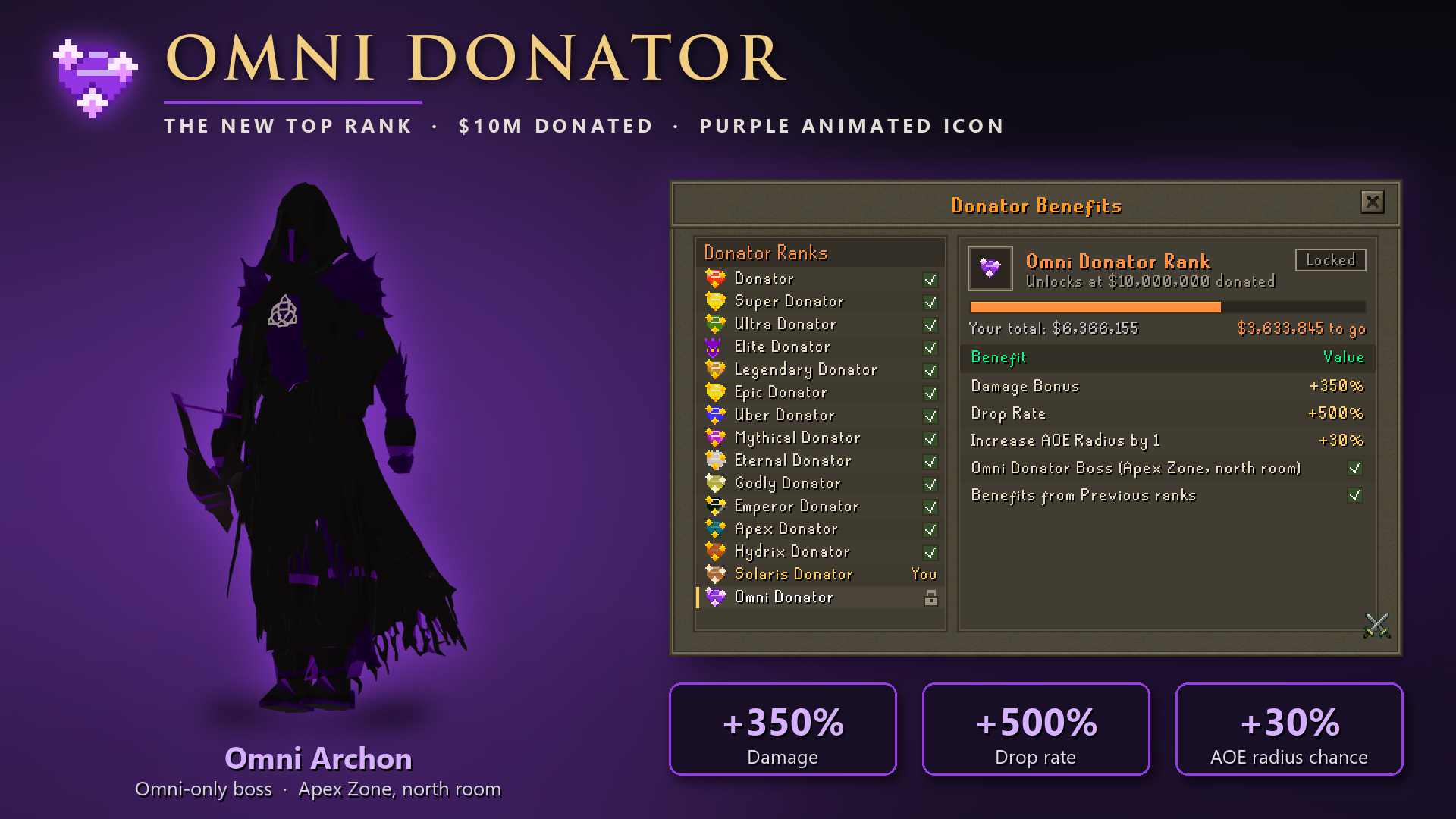
👑 New rank: Omni Donator
Omni Donator is the new top rank, at $10,000,000 total donated, with its own purple animated icon and yell and login colours.
- +350% damage (Solaris: +300%)
- +500% drop rate (Solaris: +400%)
- +30% chance to increase AOE radius by 1 (Solaris: +25%)
- Its own boss, the Omni Archon
::benefitsnow fits all 15 ranks
🏛️ New donator bosses in the Apex Zone
- Solaris Sovereign (east room): Solaris and Omni Donators
- Omni Archon (north room): Omni Donators
- Same daily kill cap as the Haunted Apex, which keeps the south room
- Better drops than the Haunted Apex: 2x / 4x Mob Tickets, about twice / three times the bonds, better attachment, goodiebag and casket rates, and Hydrix Caskets (1/1,000 and 1/750). The Omni Archon also drops Diamond Goodiebag Islands (1/750)
- Both are in the Quest tab with your kills left today
🎯 Drop rate on world and donator bosses
World bosses and the daily donator bosses now ignore your drop rate for everything except bonds. A high drop rate used to turn some of their cheaper drops into guaranteed drops every kill. Now only the $1-$100 bonds use your drop rate. ::drops shows the same.
🔥 Custom Orders Are Open!
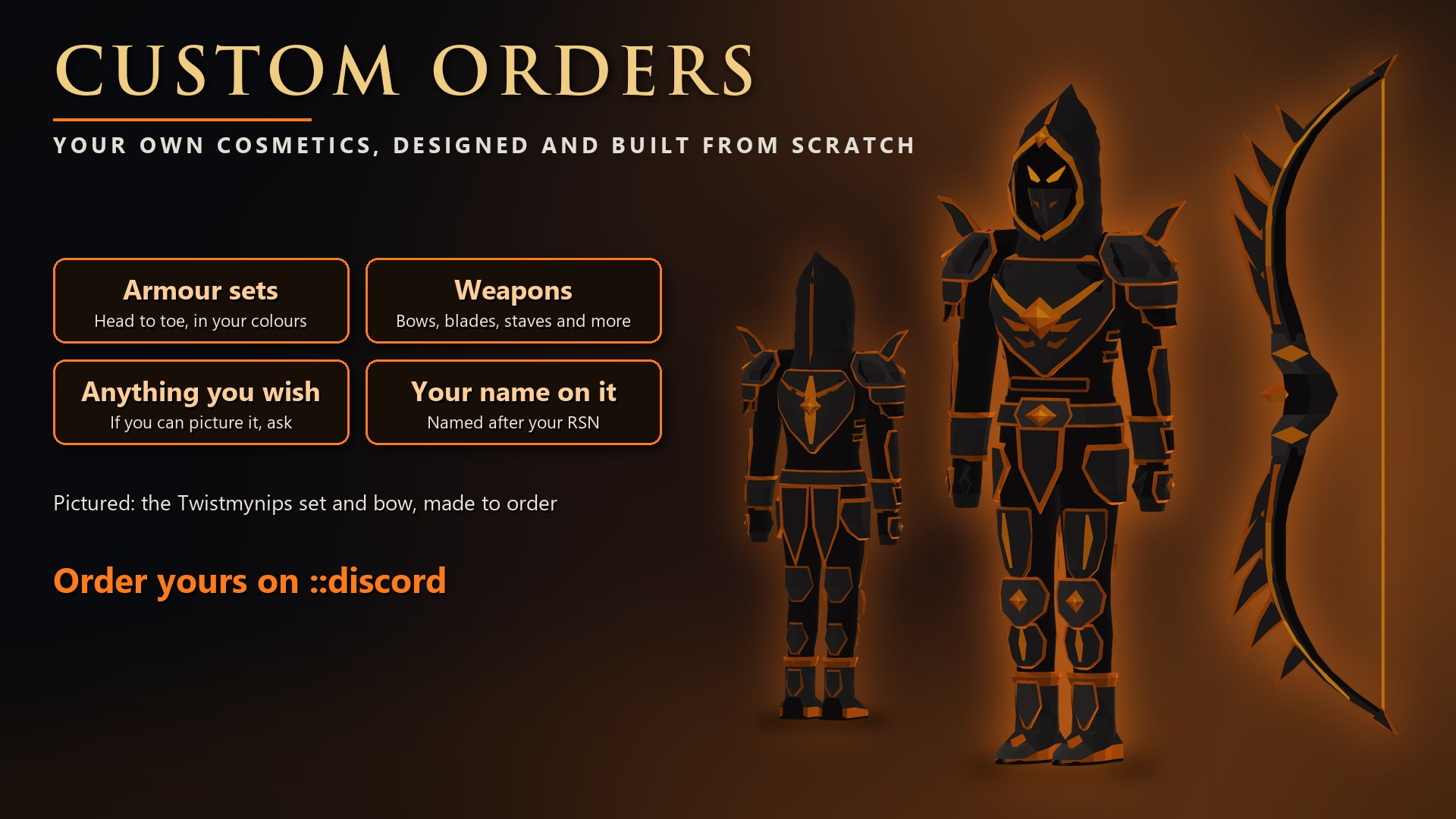
Want gear nobody else has? We'll design and build your own cosmetics from scratch, made to order just for you.
What you can order:
🛡️ Armour sets: head to toe, in your colours
🏹 Weapons: bows, blades, staves and more
✨ Anything you wish: if you can picture it, ask
📛 Your name on it: named after your RSN
Pictured: the Twistmynips set and bow, our latest custom order. Black hide and dark steel plates with molten orange trim, a hood with burning eyes, and a bow with wing feathers along its limbs.
Got an idea? Open a ticket with what you have in mind. A rough description or reference picture is plenty to start with!
🔨 Break Anvil: Redesigned
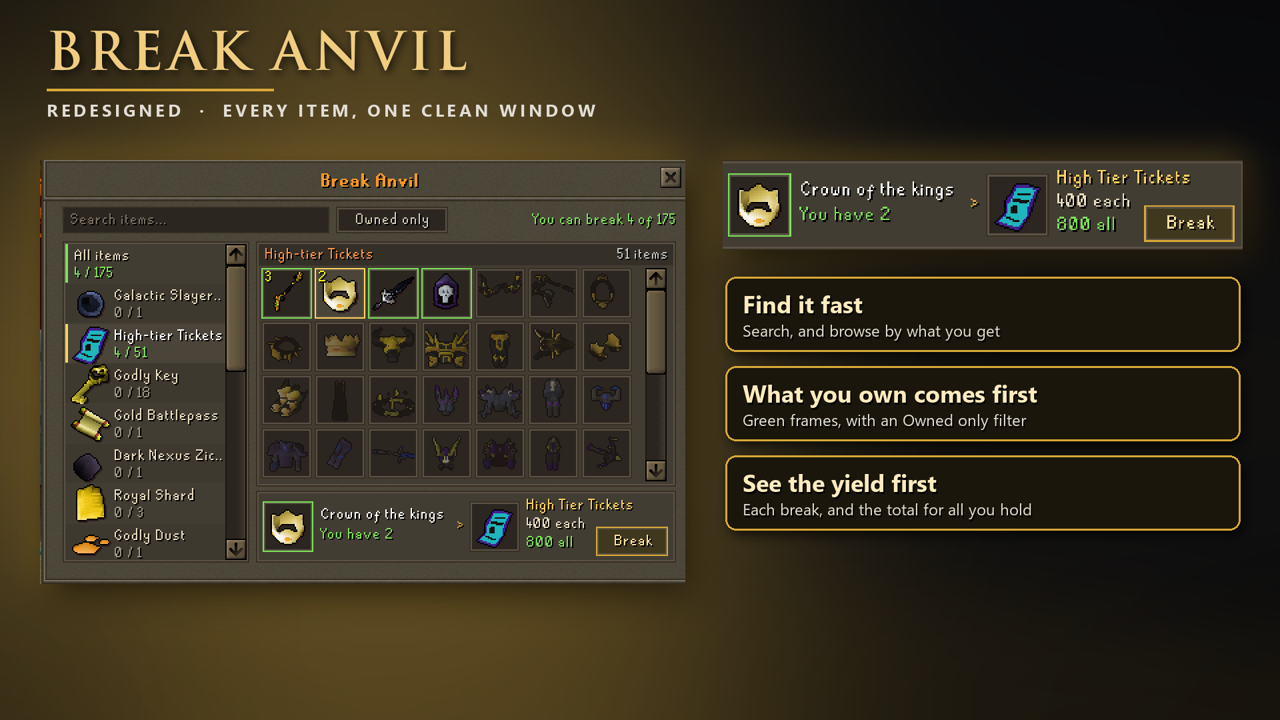
The window was getting crowded, so it has been rebuilt:
- Search any item or reward by name, or tick Owned only to see just what you are carrying.
- Browse by reward: the list on the left shows each reward you can break for, and how many of its items you hold.
- What you own comes first, in a green frame, with the biggest yields first. Everything else is dimmed.
- See the yield first: hover or click an item to see what it gives per break and for everything you hold, then press Break. Right-clicking an item you own also offers Break.
- Your filter and selection stay in place after each break, and your counts update as your inventory changes.
🧭 Teleports & Zones: rebuilt
::teleport (also ::teles, ::tele, Ctrl + T) and ::zones (Ctrl + Z) are now one system.
- Tabs: Favourites, Monsters, Zones, Bosses, Global, Minigames and the new Elite tab, each split into groups
- Locked or unlocked at a glance: a padlock and red strip when locked, a green strip when unlocked. Every tab shows how many you've unlocked
- Details panel with four pages:
- Overview: the description
- Requires: every requirement with your real progress and a bar
- Drops: what it drops, with hover details
- Preview: the monster and its stats
- Favourites: click the star to add or remove (up to 10). Your saved favourites are kept
- Right-click a row to teleport straight away
- Zones: the next zone you're working towards is marked NEXT, with a progress bar from your real kills
Isle Seasons: redesigned, with Season 9 and Divine Prophet armour
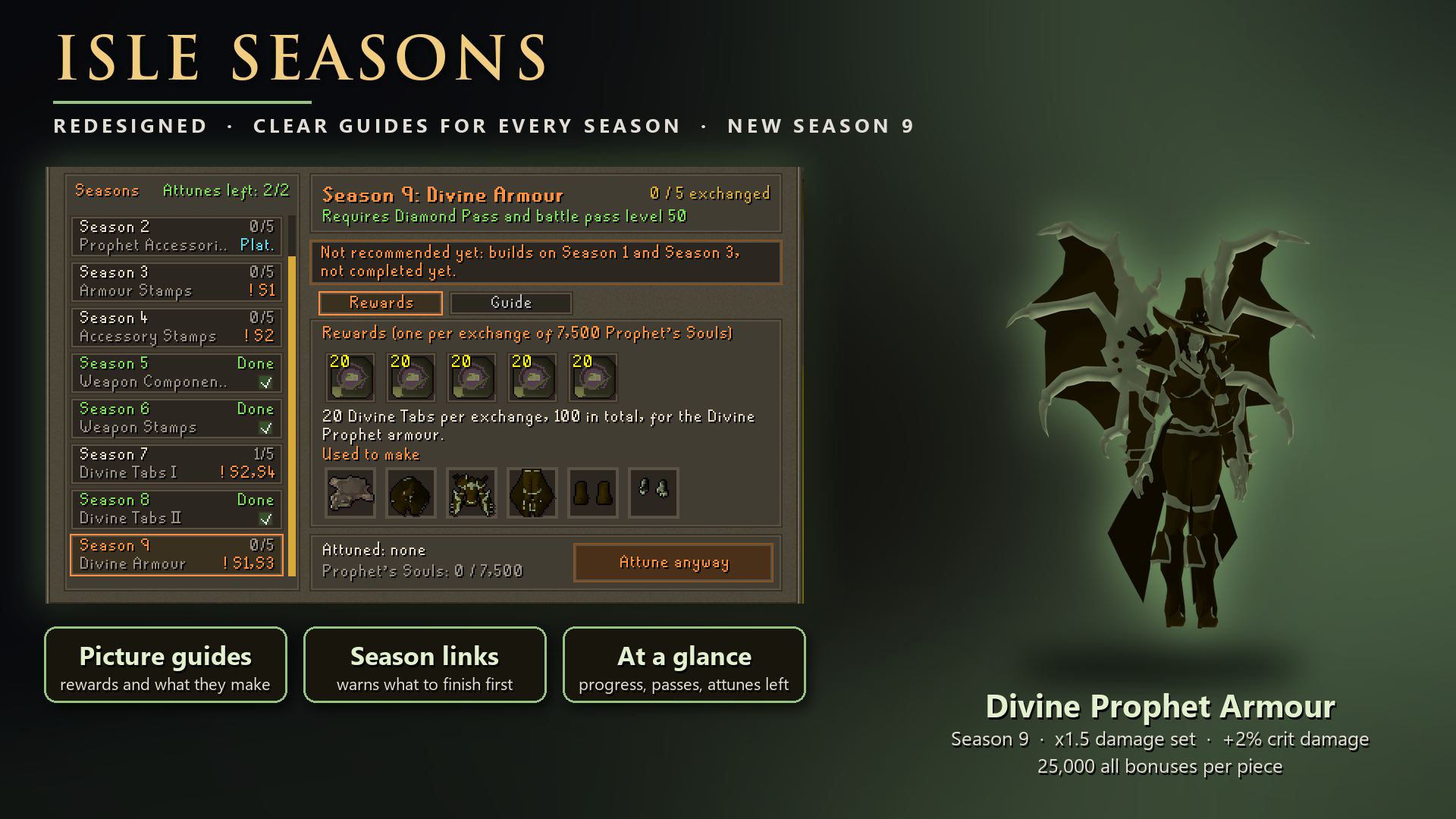
The Isle Seasons window (::isle) is new from top to bottom, every season now explains itself, and Season 9 brings a new armour set.
The new Isle Seasons window
- Every season at a glance: the list shows each season's theme, your progress, and which pass it needs. Your attunes left for this Season Pass are at the top.
- Rewards tab: every reward of the season, ticked once you have it, plus what those rewards are used to make.
- Guide tab: a picture guide. Each step is shown with the real items, like
Stamp + Armour -> Armour (i), so you can see exactly what to do with your rewards. - Season links: if a season builds on one you have not finished, the list and the season's page tell you which one. You can still attune it: you will be warned and asked to confirm.
- Attune and exchange from the same button. It also tells you when something is missing, such as the pass or your Prophet's Souls.
The rules have not changed: reach battle pass level 50 with the right pass, attune up to 2 seasons per Season Pass, exchange 7,500 Prophet's Souls for each reward, and complete each season once.
Season 9: Divine Armour (Diamond Pass)
Season 9 gives 20 Divine Tabs per exchange, 100 in total, and works like Seasons 7 and 8:
1. Click a Divine Tab to fight the Divine Overlord.
2. The Overlord drops Wolf Pelts.
3. In ::upgrade (Extras), use a Wolf Pelt to upgrade a Prophet (i) armour piece into its Divine Prophet version.
We recommend finishing Season 1 (Prophet Armour) and Season 3 (Armour Stamps) first, since the upgrade starts from their (i) armour.
Divine Prophet armour
A new five-piece set in the colours of the Divine Prophet accessories: Helmet, Platebody, Platelegs, Boots and Gloves.
- 25,000 in every bonus and 40% drop rate per piece.
- Set effect: the full set in your Keepsake slots gives x1.5 damage and +2% critical damage, like the Divine Prophet accessory set.
Instance System Reworked
Instances: faster starts, Replay and a new Slayer window
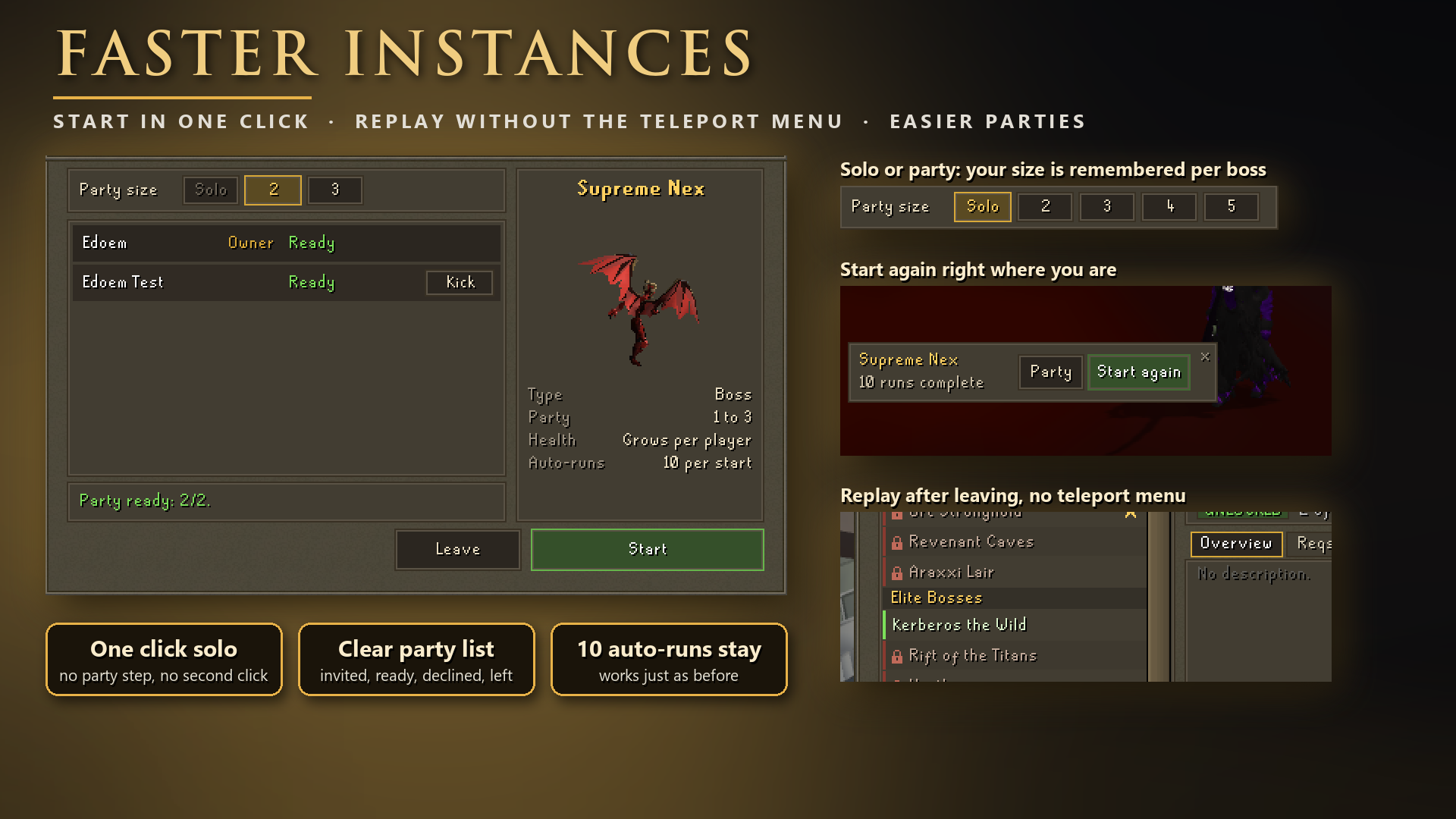
Starting and repeating instances takes far fewer clicks. The 10 auto-runs work just as before.
Boss and wave instances
- Solo is one click: press Start and the run begins.
- Party size: choose Solo or any size the encounter allows. It's remembered for each encounter.
- Clear party list: see who is ready, who has been invited and which slots are open.
- Details at a glance: a boss preview, party limits, whether its health grows per player, and whether it has auto-runs.
- Invite from any open slot: a party is created for you if you don't have one. Invite last party asks your last group again.
- Start early: the owner can start with whoever has joined. Invitations expire after 30 seconds.
Slayer instances
- New window: search and scroll the monster list, with a preview of the monster you pick.
- Favourites: star your favourite monsters.
- View drops: open a monster's drop table straight from the window.
Start again and Replay
- Start again: between runs, a small panel lets the owner go again right where they are. It also appears after a batch of 10 auto-runs and starts the next 10.
- Slayer too: the panel shows the monster and its cost, and greys out if you can't pay.
- Replay: after you leave a run, a panel offers that encounter again for 2 minutes, with no teleport menu. You can also type
::replay. - Requirements still count: every start checks them again, and boss tabs are only used once the run has begun.
- Nothing starts on its own: Replay needs your click. A remembered party size opens the window so you can invite first.
Interface Rework
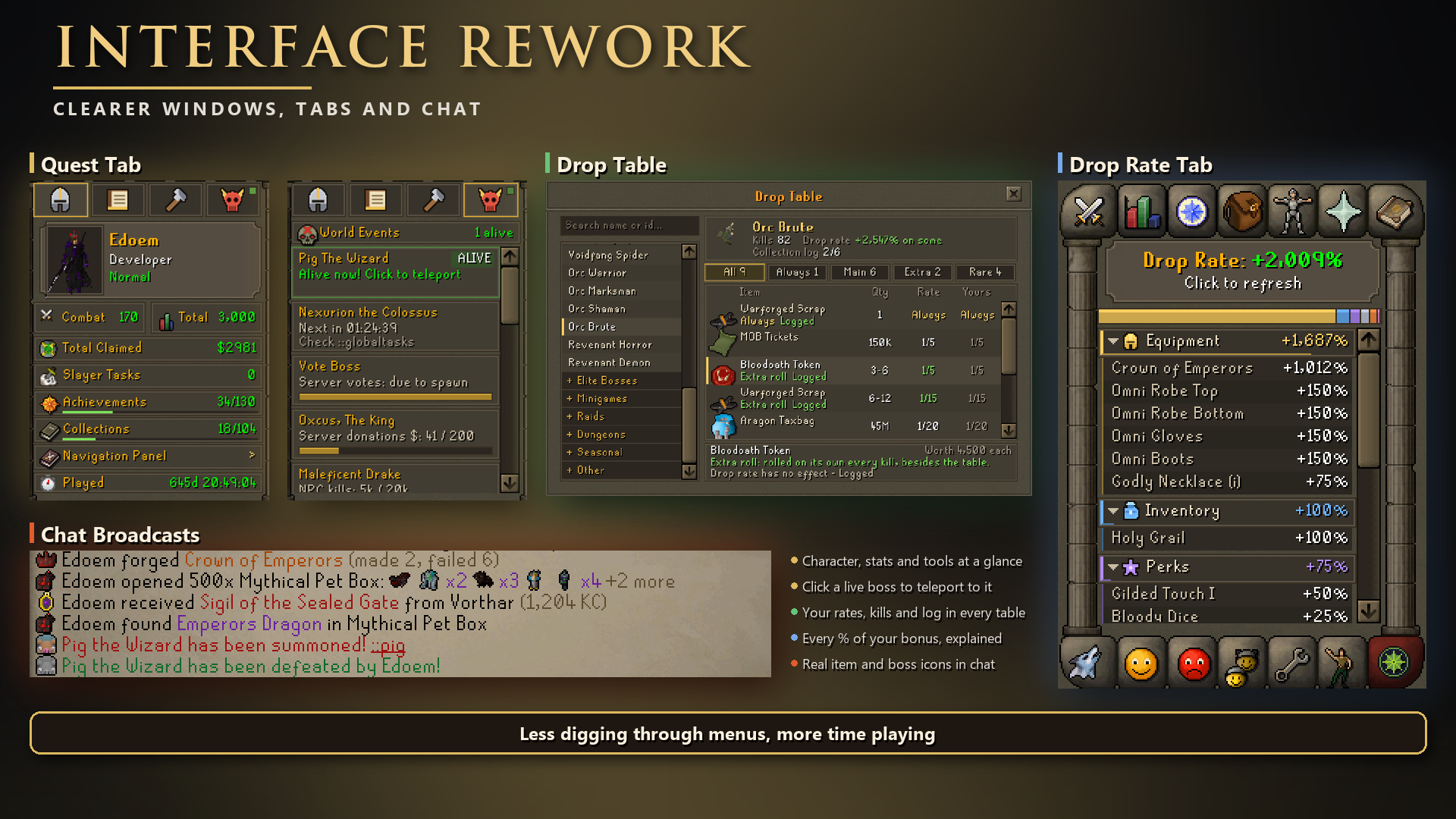
The Quest Tab, Drop Table, Drop Rate Tab and chat broadcasts have all been redesigned, so they're easier to read and need fewer clicks.
Quest Tab
Now split into four icon pages:
- Character: your portrait, rank, combat and total level, achievements, collections and time played
- Ledger: your account details in sections you can fold, including Slayer and Blood Slayer
- Tools: one-click shortcuts to Upgrades, Season Pass, Collections, Best In Slot and more
- World Events: every global boss with its spawn progress or daily kills left
Live bosses appear at the top of World Events. Click one to teleport straight to it!
Drop Table
- Search any monster by name or ID, or browse by category
- Filter drops with the new tabs: All, Always, Main, Extra and Rare
- Sort drops by any column
- See your rate beside the base rate, plus which drops your drop rate doesn't affect
- Quantities now show the full range, such as 3-6
- Track your kills, collection log progress and dry streak for that monster
Drop Rate Tab
- See your total bonus at the top, with a colour bar showing where it comes from
- Open any source to see exactly what adds to it, item by item
- Hover over the total to see what it means in practice, such as 1 in 1,000 becoming about 1 in 48
- Click the top panel to refresh your numbers
Chat Broadcasts
- Every broadcast now starts with an icon of the actual item or boss
- Global boss portraits turn grey once the boss is defeated
- Rank icons are gone from broadcasts, so busy chat is easier to read
- Open All and Quick Upgrade now send one line instead of one per item
- Chests now announce anything above Uncommon on both Open and Open All
- Your broadcast filters still decide what you see
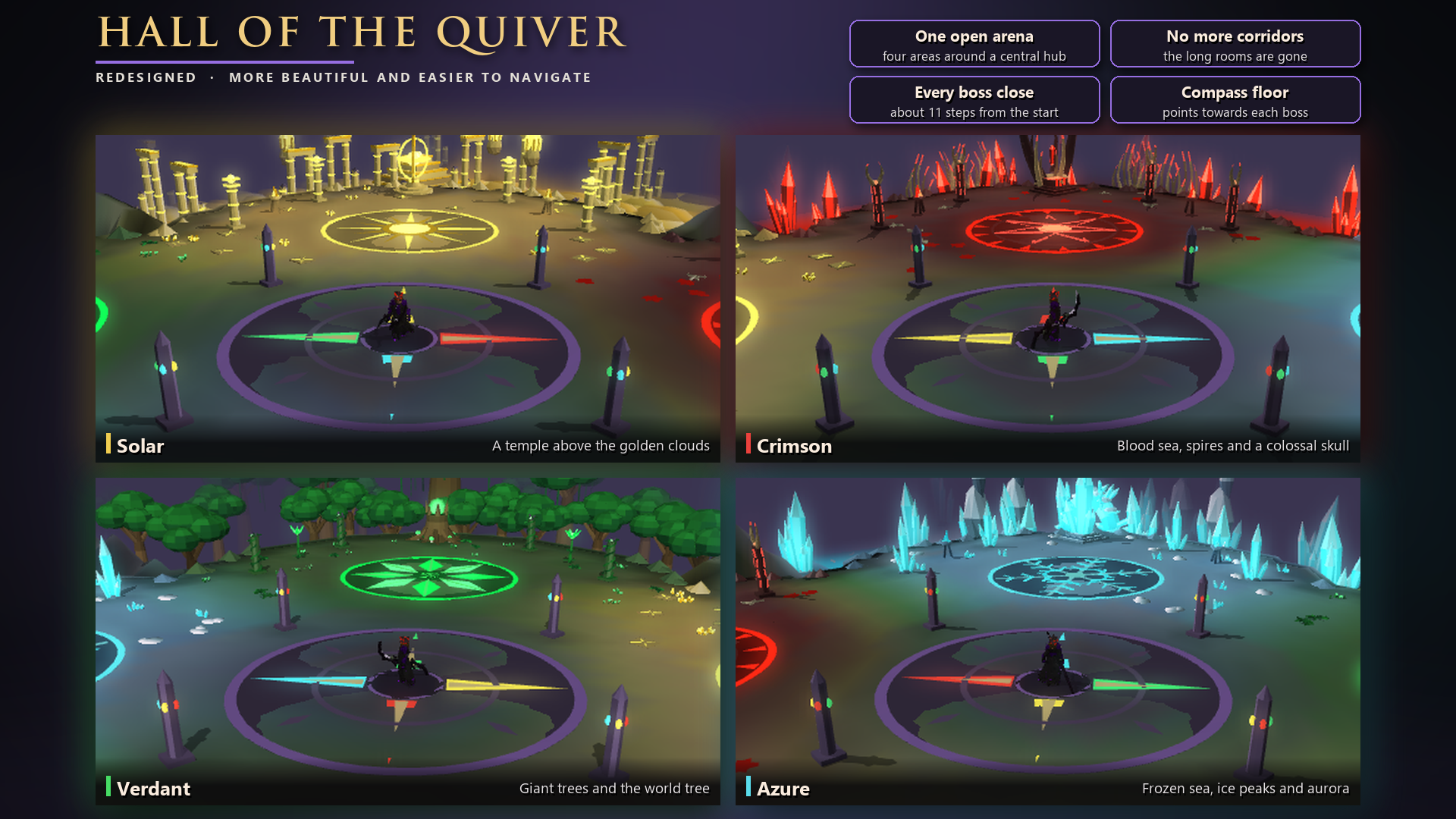
Hall of the Quiver: redesigned
The new Apex Quiver gives you a reason to play Hall of the Quiver again, so we rebuilt the map first. This redesign addresses your feedback and the biggest pain points of the old layout.
What changed
- One open arena: the four long rooms and narrow corridors are gone. Everything now sits around one central hub.
- Easier to navigate: you start in the middle, with each boss about 11 steps away.
- Compass floor: coloured arrows in the middle point towards each boss, so you always know which way to go.
- Clear boss areas: each boss has its own glowing emblem and theme, so you can tell where you are at a glance.
The four areas
- Solar: a golden temple above a sea of clouds
- Crimson: a blood sea, spires and a colossal skull
- Verdant: a forest of giant trees and the world tree
- Azure: a frozen sea, ice peaks and aurora
Why play it again?
The Apex Quiver (::upgrade, Extras) is the new best in slot quiver:
- 70,000 in every bonus
- 30% chance to double Hall of the Quiver rewards (the Godly Quiver has 25%)
- Your hits heal you, like the other top quivers
- The upgrade needs 10,000 each of Crimson, Azure, Verdant and Solar essence, along with the Godly Quiver and other materials
The bosses and rewards are unchanged. Only the map is new.
Patch Notes
🎃 Halloween has ended
- The Halloween chest, zombies, Gengar, the Halloween Knight and Pumpkin Head are gone. The Halloween commands now just say the event has ended
- Voting keeps a bonus: once every 12 hours,
::claimstill gives 3 Halloween Boxes. The 1 in 50 Legendary Card Pack roll stays
📉 Lower boss requirements
- Rift of the Titans: 10,000 → 5,000 Dark Angel kills (500 Kerberos kills and the sacrifice are unchanged)
- Umbra: 7,500 → 3,500 Kerberos kills
- Supreme Nex: 2,000 → 1,000 Titan Key opens
🗿 World boss altars
Offer your spawn tokens at an altar and it summons the boss for you, one after another.
- Wizard's Altar (Pig the Wizard,
::pig), Falcon Perch Altar (Cult Falcon,::falcon), Zarathos Altar (::zarathos) and Royal Altar (Oxcus,::oxcus), each beside its arena - Offer tokens asks how many, so you never offer more than you meant. Check shows the queue
- Anyone can add tokens, and the whole server sees each offering
- 3 seconds after an offering (and after each boss dies) the next boss is summoned, until the queue is empty
- Everyone near the altar sees a countdown bar with the tokens left
- Server-wide progress still comes first, and offered tokens survive restarts
🛠️ Quality of life
- Kills left in instances: wave instances (raids, Hall of the Quiver, boss instances and more) now show the current wave and how many kills are left
- Potion top-ups: drink a timed potion while it's still active to reset its timer to full. Works for Godly, Owner, Eternal and Aggression potions and the boosters. 10-second cooldown per potion
- SoLK now restarts automatically after every completion, like CoA (every 10th run waits for the leader)
- Fixed: your prayers were switched off at the start of every SoLK run
🎁 Rewards
- Forsaken Trinity chest: now also gives Diamond Goodiebag Islands, as often as the Mob Tickets
- Hall of the Quiver toolboxes now benefit from the Well of Goodwill drop rate boost and the double-drop happy hour
- Elite Barrows items can now be broken into Cursed Keys: 10 per armour piece, 15 per weapon
- Vote Voucher chest: now also has a Hydrix Casket, a Platinum Battlepass and a Legendary Pet Mystery Box (1 in 19,000 each)
- Mysterious clue scrolls and Cash Caskets no longer drop from monsters, to keep your inventory clear. Ones you have can still be opened
- A small stone Vorthar that follows you. 20% chance of an extra Vorthar Key on each completion. It is a rare from the Vorthar Chest, about 1 in 5,000, and is also part of the Emperors Dragon upgrade.
📖 New Collection Log: Celestial Casket
The Boxes tab now has a Celestial Casket log. Complete it for 3 Celestial Caskets.
Items from caskets you opened before today are not in the log; it fills from your next opening.
🔨 Break Your Gear for High-Tier Tickets (Break Anvil)
Use the Break Anvil to turn these into High-Tier Tickets:
- Crown of the Kings — 400 High-Tier Tickets
- Crown of the Gods — 800 High-Tier Tickets
- Each Galactic Slayer armour piece and weapon — 150 High-Tier Tickets
🛒 Shop Changes
- MOB Ticket Store: Diamond Taxbag now costs 3M Mob Tickets (was 3.5M).
- High-Tier Tickets Shop:
- Omni Casket is now sold for 1,500 tickets.
- Diamond Battlepass now costs 2,000 tickets.
💰 Price Checks
Examining these items now shows a price range:
- Every Omni armour piece and weapon — 40B–50B
- Holy Grail — 12B–15B
- Unholy Grail — 80B–100B
🐛 Fixes
- Fixed a black screen when zoomed out near the edge of a loaded area (for example at
::afk) - Fixed an error when transformed into certain NPCs
- Fixed boss pets disappearing when you logged out with them summoned
- Item hovers on wearable items no longer show stray underscores
You'll need the new client for this update. Thanks for all the feedback, and see you in the Elite zones! ⚔️